FIELD NOTE / 05
From a generated cup to a publishable image
A saved FLUX Schnell result, an honest visual review and a local export exercise you can repeat.
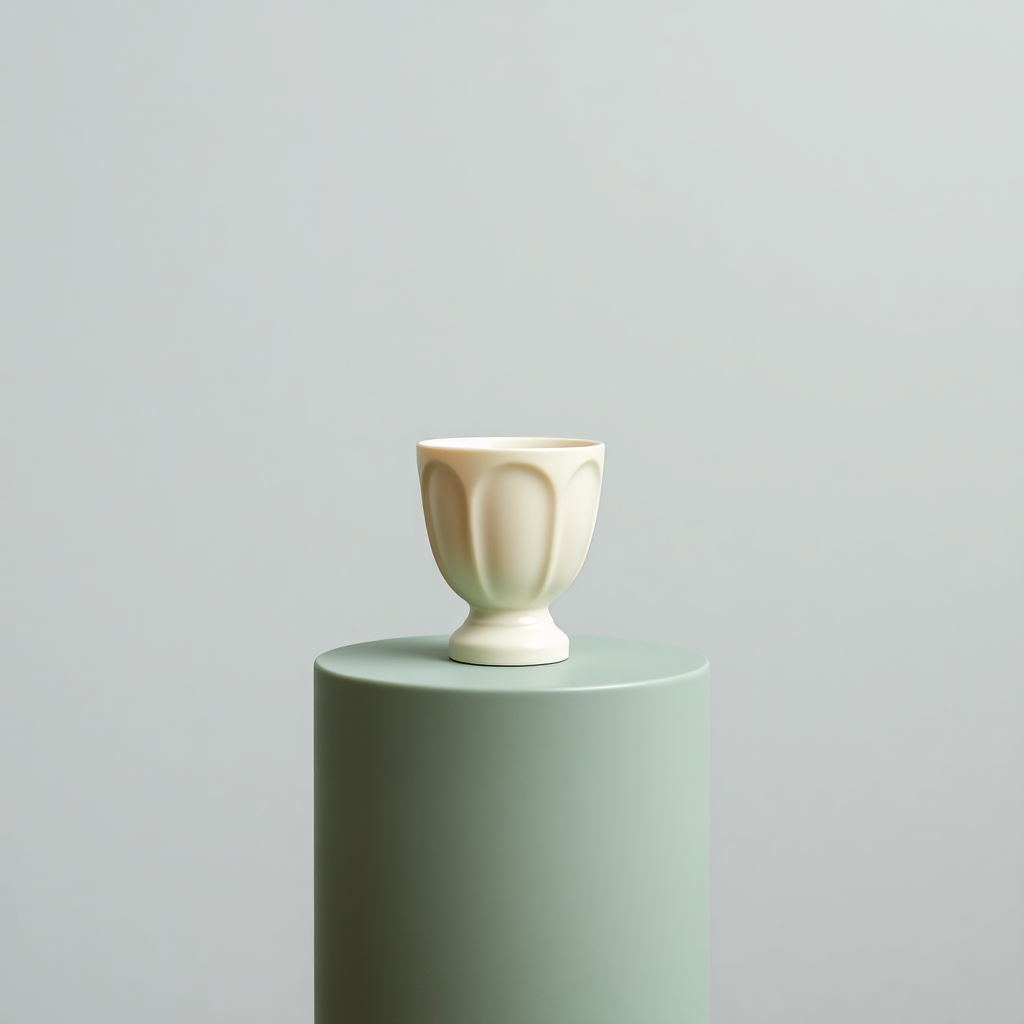
What was actually generated
The local Replicate integration test saved this PNG using black-forest-labs/flux-schnell, square format and the Photography style. The user prompt was: “A single ivory ceramic cup on a sage green pedestal, soft studio light, no text, no logo”. The adapter also adds its photography style instructions. This is one saved output, not a controlled comparison or a guarantee that the same words reproduce the same cup. No seed was recorded for this run.
What the image gets right—and what to question
The image contains one ivory vessel above a green cylindrical pedestal, with a broad quiet background and soft shadows. No lettering is visible. However, the vessel has a fluted body and a foot; it has no visible handle. If your brief meant a handled mug, this output would need a revised prompt. The bottom of the pedestal is already outside the original frame. A resize cannot recover it. These are observations of this file, not claims about every FLUX result.
Choose the destination before exporting
For a square card, use 600 × 600 Resize with aspect lock; the full source frame stays visible. For a 1200 × 800 article header, compare Center crop and Fit entire image. The centered crop removes top and bottom source pixels; Fit retains the frame but adds side margins. White margins on JPEG can be noticeable against a colored website. Transparent PNG or WebP margins may suit that layout better. Test against the actual page background.
Repeat the export in your browser
Open Image tools and choose “Try the ceramic cup sample”. Select a canvas, a fit mode and a file format, then prepare the download. Switch between the original and export previews before saving. Record dimensions, bytes and settings using “Download processing notes”. Those notes are created locally and contain no API credentials. Your byte sizes may differ across browsers; this article does not invent a compression percentage.
Our October 17 export check
We loaded this 686,429-byte source in the site tools, selected a 1200 × 800 center crop and exported PNG in the Codex in-app browser. The downloaded file measured 1200 × 800 and 889,756 bytes; the downloaded JSON record matched those values. It was larger than the original, despite showing less of the source frame. PNG was therefore not a size-saving choice in this particular test. This is one browser result, not a general compression benchmark.
A publication decision, not just a download
This image can illustrate a hypothetical ceramic concept. It should not be used as evidence of a real item’s shape, dimensions, manufacturer or availability. Add final text in a layout editor, write an alt description that matches the visible vessel and keep the original beside the export. If you require a complete pedestal or a specific handle, return to the brief before spending time compressing an unsuitable image.
A revised prompt adds a handle, but not a complete pedestal →
Try this workflow
Use our saved 1024 × 1024 AI sample. No generation credit or file upload needed.
Open image tools ↗From idea to a published blog image
A practical path for blog authors and small website owners. Work with the saved sample, inspect the evidence, then apply the method to your own article.